
User Guide for the Fully Integrated High-Frequency Synchronous Buck Converter IS6608A
I. Product Guide
As China's first multi-phase parallel power supply chip capable of powering CPUs, the IS6608A is a fully integrated, high-frequency synchronous buck converter compatible with the PMBusTM interface. It employs a 4mm x 5mm FCQFN-25 package, delivering up to 30A output current per phase over a wide input range. It supports up to 8 chips in parallel for a peak output current of 240A. In high-current applications, the IS6608A achieves excellent current sharing and phase interleaving, minimizing the use of existing standard external components.
| Chip Category | DC/DC Buck Converter |
| Model | IS6608A |
| Input Voltage | 3.3V - 16V |
| Output Voltage | 0.4V - 5.5V |
| Output Current | MAX 30A |
| Voltage Accuracy | 0.5% |
| Frequency | 400kHz, 600kHz, 800kHz, 1MHz |
| Parallel Phases | MAX 8 Phases |
| Efficiency | Above 90% |
| Operating Temperature Range | -40ºC to 125ºC |
| Application Scenarios | Servers, Desktops, Laptops, Base Stations, etc. |
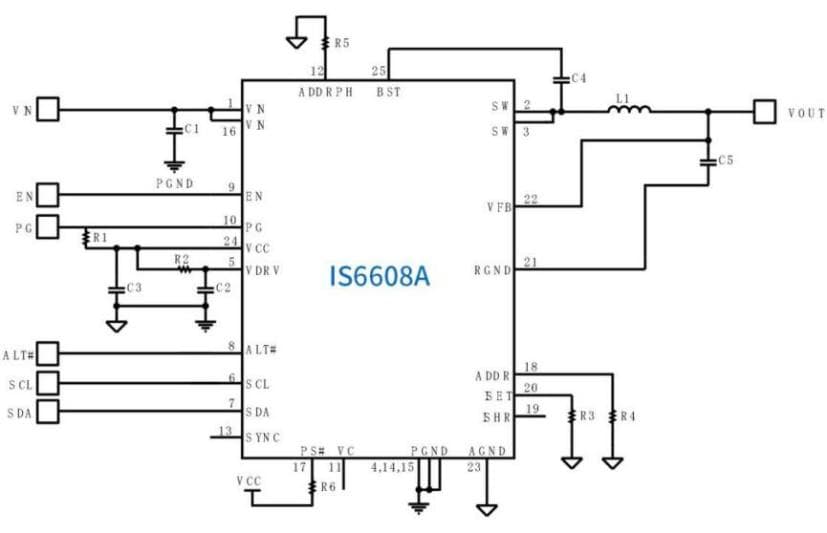
The IS6608A's GUI and peripheral circuit configurations can be modified according to diverse end-user scenarios. To assist customers more quickly and conveniently in completing product design integration, this article will systematically explain common issues and their solutions encountered during the use of the IS6608A, providing readers with a clear introduction to precautions during usage.
II. GUI Introduction
The IS6608A GUI is a graphical user interface software tool independently developed by IVS and designed for use with the IS6608A. It helps users debug internal configurations more conveniently, quickly, and intuitively. The IS6608A GUI complies with the PMBus protocol and communicates with the IS6608A via a USB-to-I²C decoder (dongle). The interface of the IS6608A GUI software is shown below:
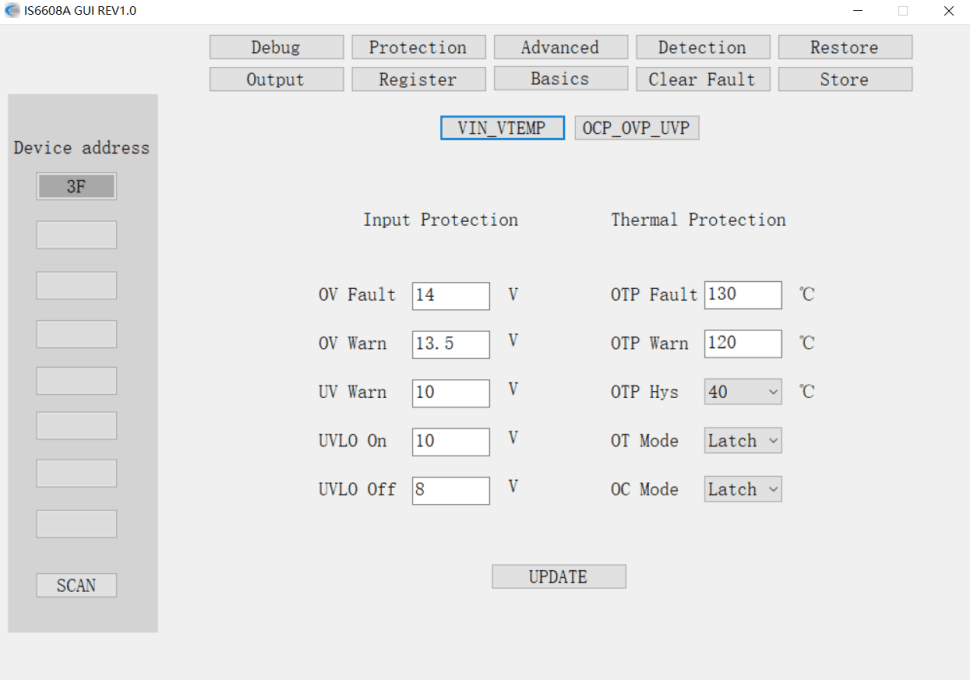
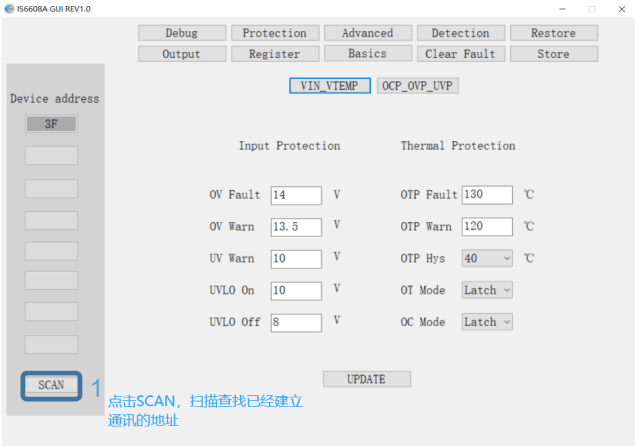
Step 1: Click SCAN to search for addresses that have established communication.
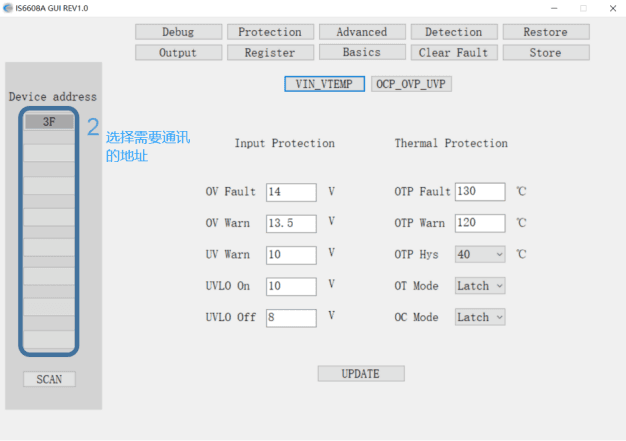
Step 2: Select the address to communicate with.
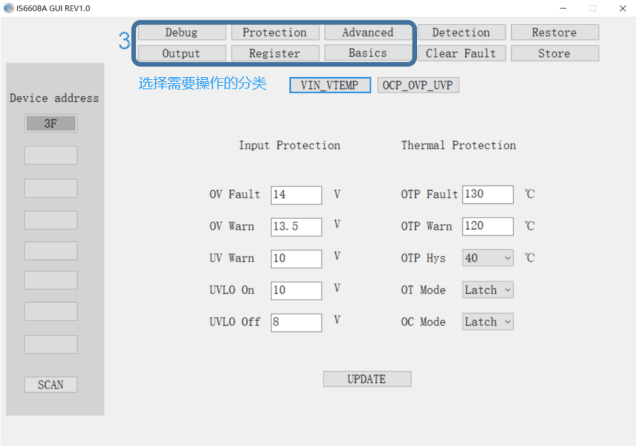
Step 3: Select the category for operation.
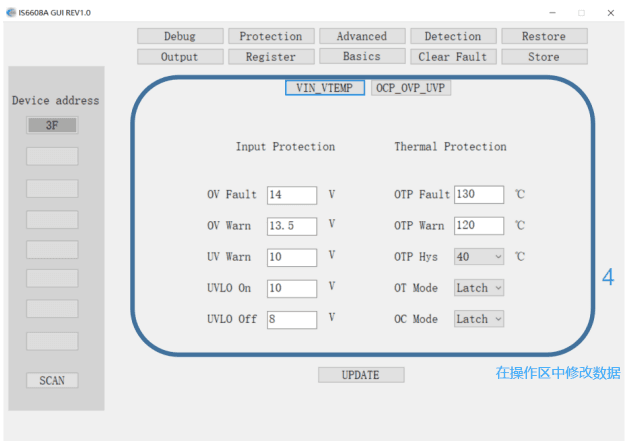
Step 4: Modify data in the operation area.
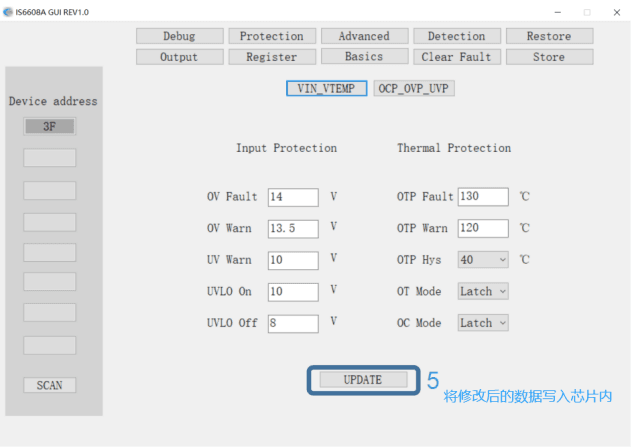
Step 5: Write the modified data into the chip's registers.
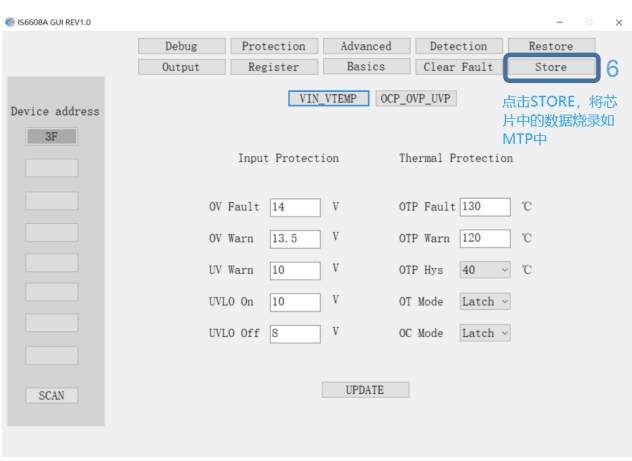
Step 6: Click STORE to burn the data from the chip's registers into the MTP (Multiple-Time Programmable) memory.
2.2 Output Voltage Adjustment
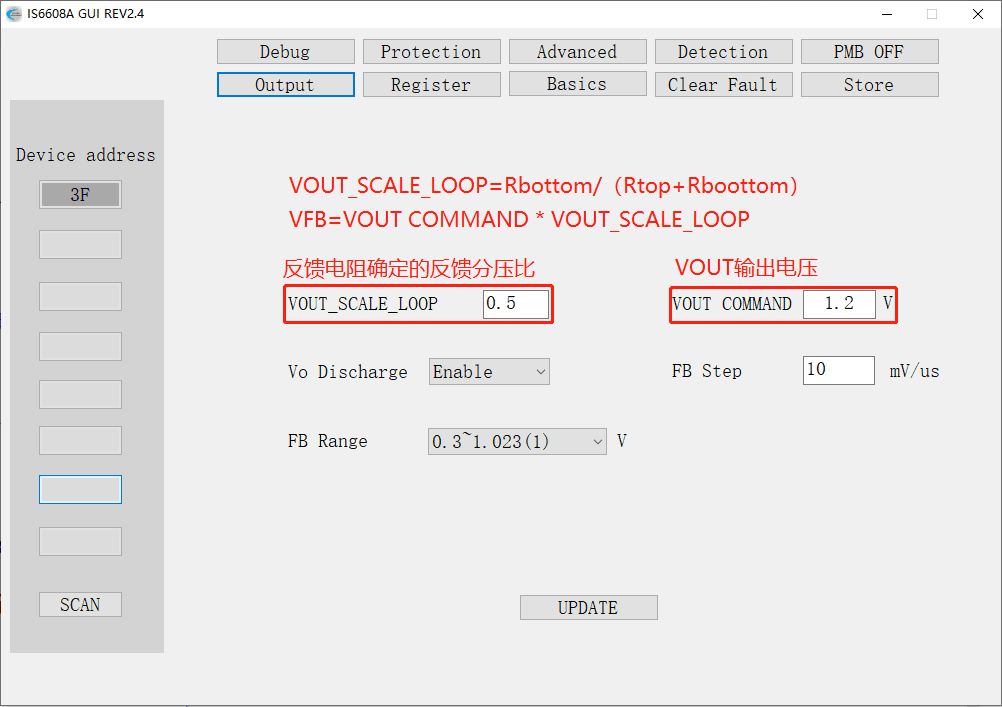
VOUT COMMAND and VOUT_SCALE_LOOP are used to set the VFB voltage. The formula is:
VOUT COMMAND * VOUT_SCALE_LOOP = VFB
VOUT_SCALE_LOOP = VFB / VOUT = Rbottom / (Rtop + Rbottom)
For example, to configure an application with Rtop=2kΩ, Rbottom=6kΩ, and VOUT=0.8V, the output voltage setting steps are as follows:
- Based on Rtop=2kΩ and Rbottom=6kΩ, VOUT_SCALE_LOOP = 6kΩ / (2kΩ + 6kΩ) = 0.75
- Since VOUT=0.8V, VOUT COMMAND = 0.8V
- Click UPDATE to write the data to the chip's registers.
- Click STORE to save the register data to MTP. At this point, VFB = 0.8V * 0.75 = 0.6V
2.3 Reading the VOUT Value
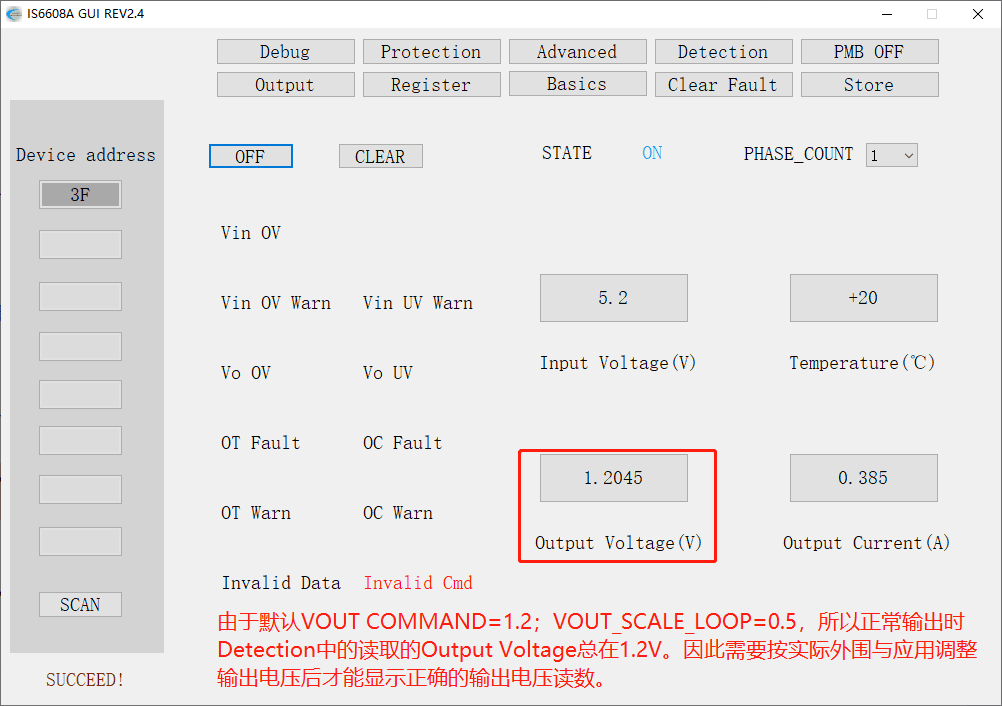
The VOUT voltage reading from the chip actually reads the VFB voltage. To display the correct output voltage in the Detection section, VOUT COMMAND and VOUT_SCALE_LOOP must be configured correctly. As shown in the figure below, the phase PS# pin must be pulled up to VCC via a 10kΩ resistor.
To illustrate, the steps for reading the output voltage in an application with Rtop=2kΩ, Rbottom=6kΩ, and VOUT=0.8V are as follows:
- Based on Rtop=2kΩ and Rbottom=6kΩ, VOUT_SCALE_LOOP = 6kΩ / (2kΩ + 6kΩ) = 0.75
- Since VOUT=0.8V, VOUT COMMAND = 0.8V
- Click UPDATE to write the data to the chip's registers.
- Click Detection to read the correct VOUT voltage on the GUI.
Note: Resistor accuracy will affect the accuracy of the VOUT reading.
The IS6608A features comprehensive protection functions, including Over-Current Protection (OCP), Negative Over-Current Protection (NOCP), Over-Voltage Protection (OVP), Under-Voltage Lockout (UVLO), Over-Temperature Protection (OTP), and other protective mechanisms. These are designed to protect the chip from damage in the event of faults or unexpected actions that cause abnormalities.
2.4 OTP Protection Mode Setting
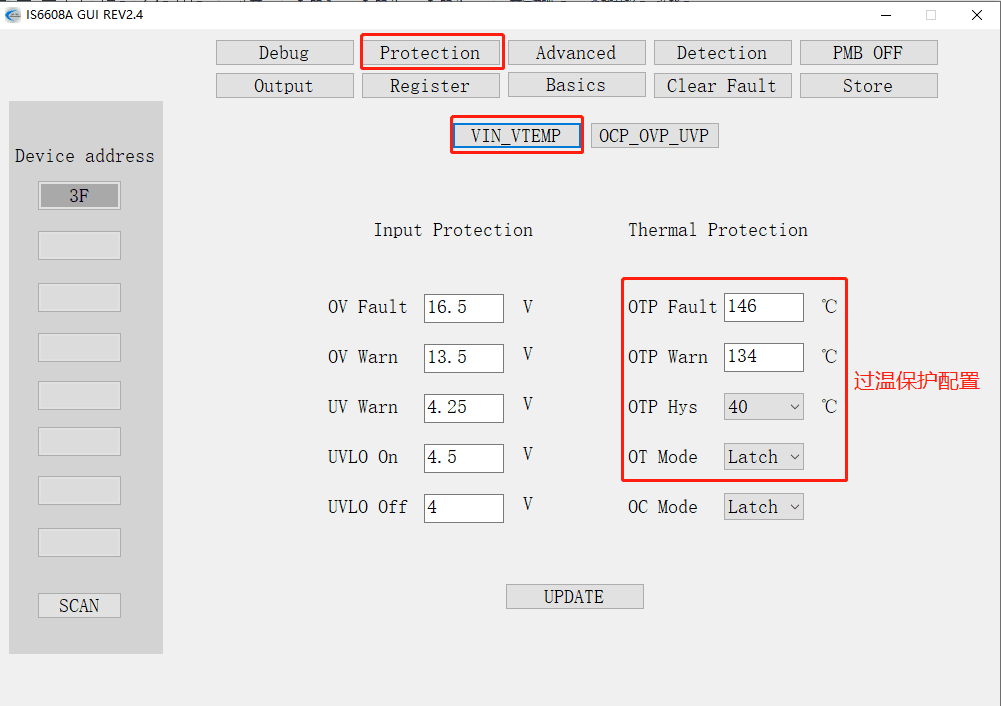
The default OTP protection temperature is 146°C, and the default protection mode is Latch. The figure below shows the modification steps. The protection mode can be set to Latch or Retry [including the hysteresis temperature for RETRY]:
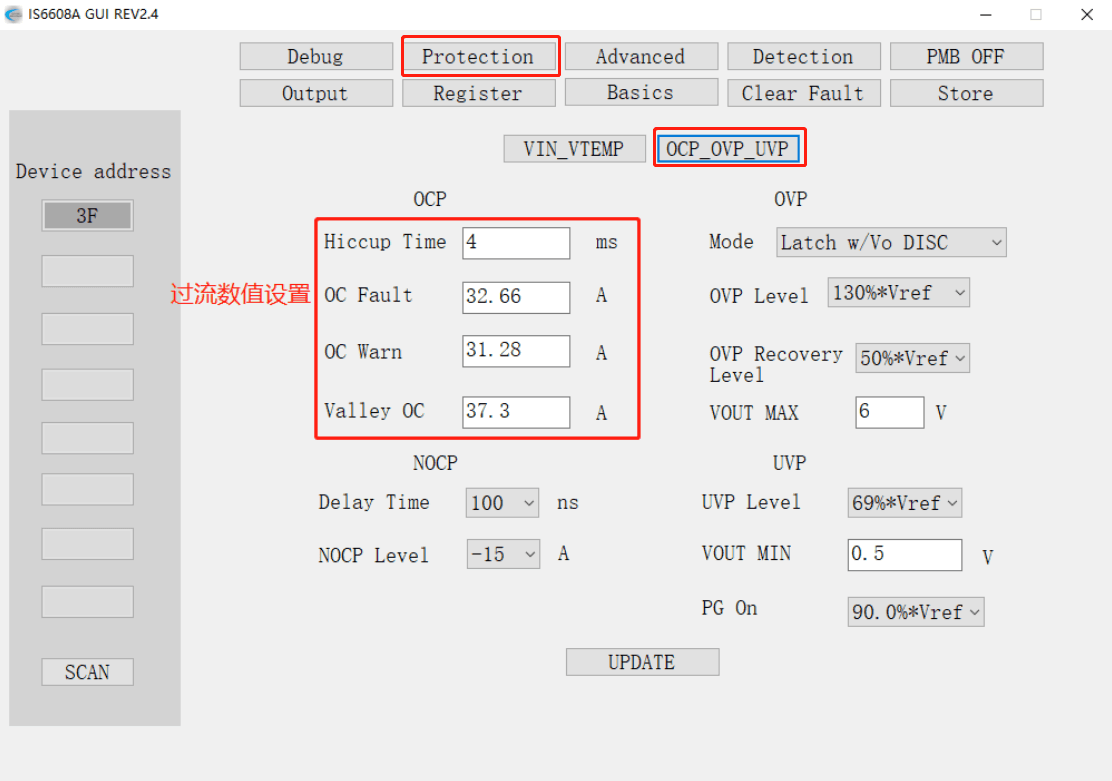
2.5 OCP Protection Mode Setting
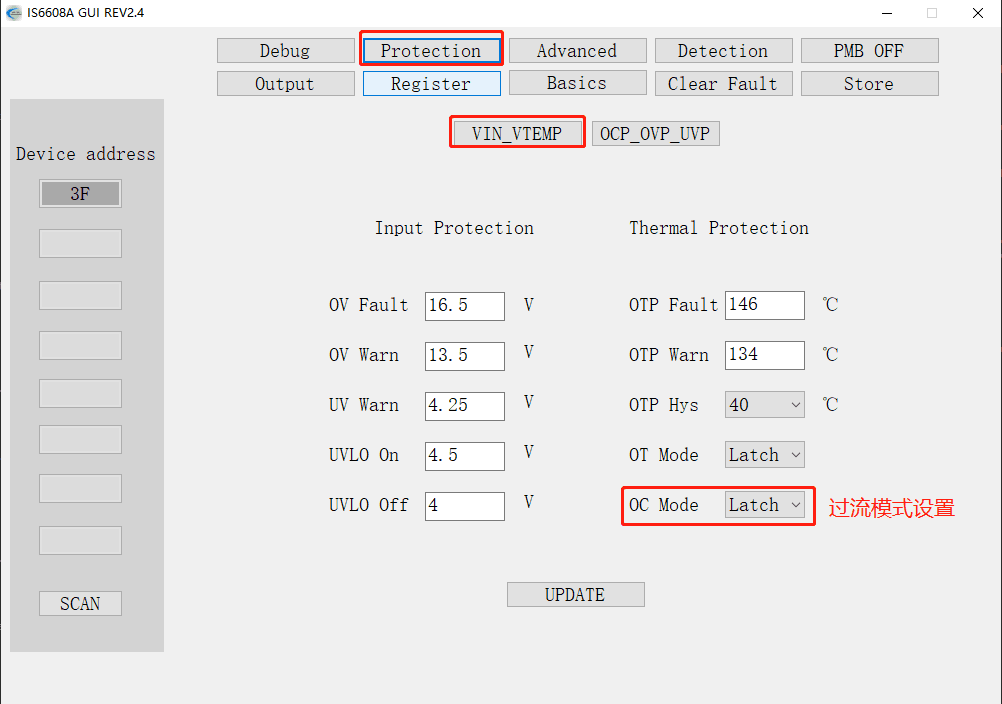
The default DC protection current is 32.66A, and the default protection mode is Latch. The figure below shows the modification steps. The protection mode can be set to Latch or Retry [including the Hiccup Time for Retry]:
2.6 OVP Protection Mode Setting
The default over-voltage protection value is 130% * Vref, and the default protection mode is Latch. The figure below shows the modification steps. The protection mode can be set to Latch or Retry [including the recovery voltage and protection method for Retry]:
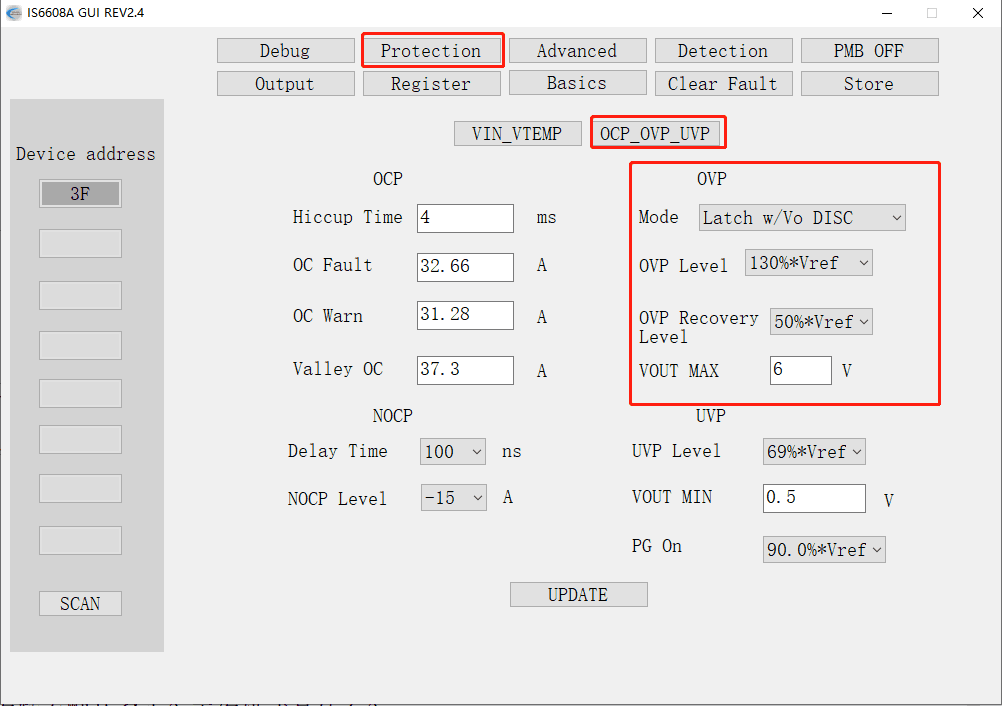
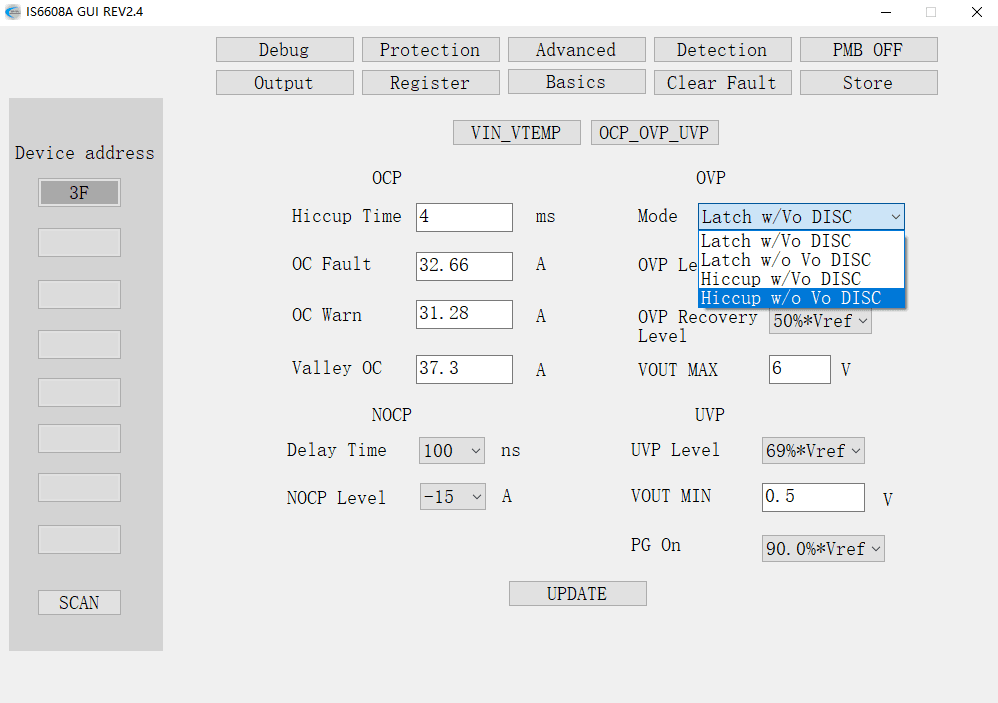
Four response modes are available, including Latch & Hiccup and w/Vo DISC & w/o Vo DISC. They are distinguished as follows:
- Latch: Upon OVP trigger, the power latches off and requires a manual restart.
- Hiccup: After the voltage drops to the level set by OVP Recovery Level following OVP, the power restarts.
- w/Vo DISC: After OVP is triggered, the Vo Discharge function is used to pull the output voltage low.
- w/o Vo DISC: After OVP is triggered, the Vo Discharge function is not used to pull the output voltage low.
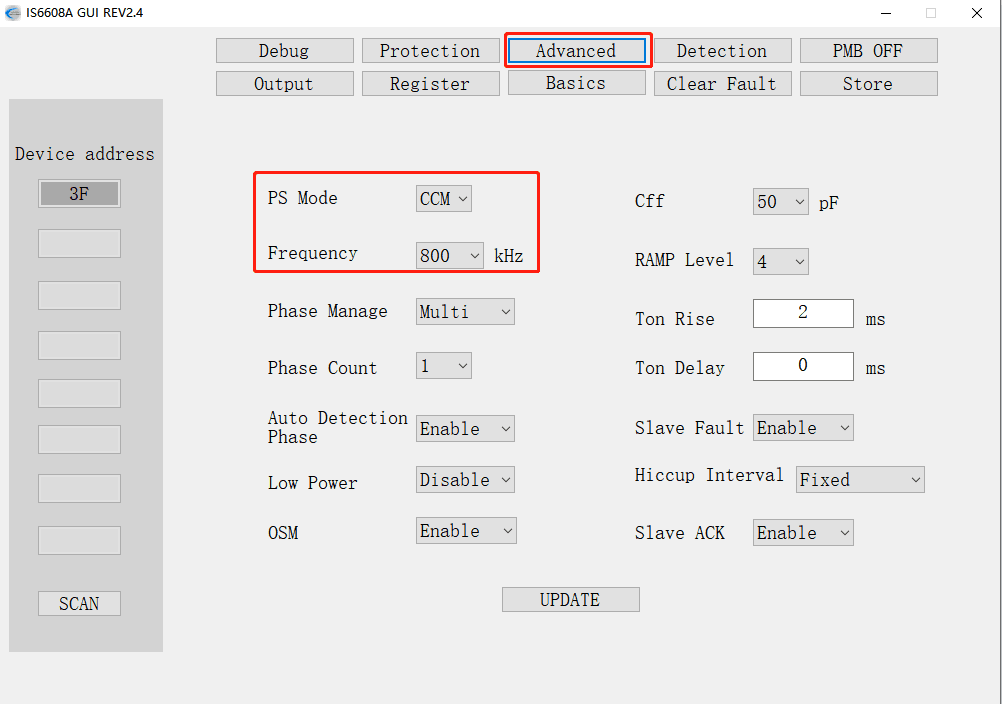
2.7 Chip Operating Frequency and Mode Setting
The default operating frequency is 800kHz, and the default operating mode is FCCM. The figure below shows the category where these settings are located:
III. Trace/Layout Recommendations
The IS6608A's peripheral pins include configurations for power input/output, voltage feedback sensing, communication address setting, current information sharing, driver, synchronization, and phase master/slave configuration, placing relatively high requirements on IC trace routing and component placement. Good peripheral trace routing/layout can effectively influence the chip's working efficiency and stability. Additionally, the peripheral circuit can provide good electromagnetic compatibility and reduce noise and interference susceptibility.
It is worth noting that, without specific requirements, the GUI is not essential for using the IS6608A. However, trace/layout is one of the critical aspects users need to pay close attention to. The recommendations are as follows:
- In multi-phase parallel configurations, place a 3K resistor near each phase's ISHR pin.
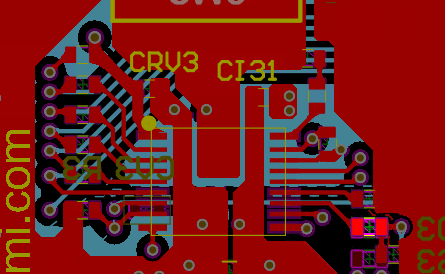
- Place as many VIAs as possible directly under the chip and near the chip's VIN/GND pins and copper pours.
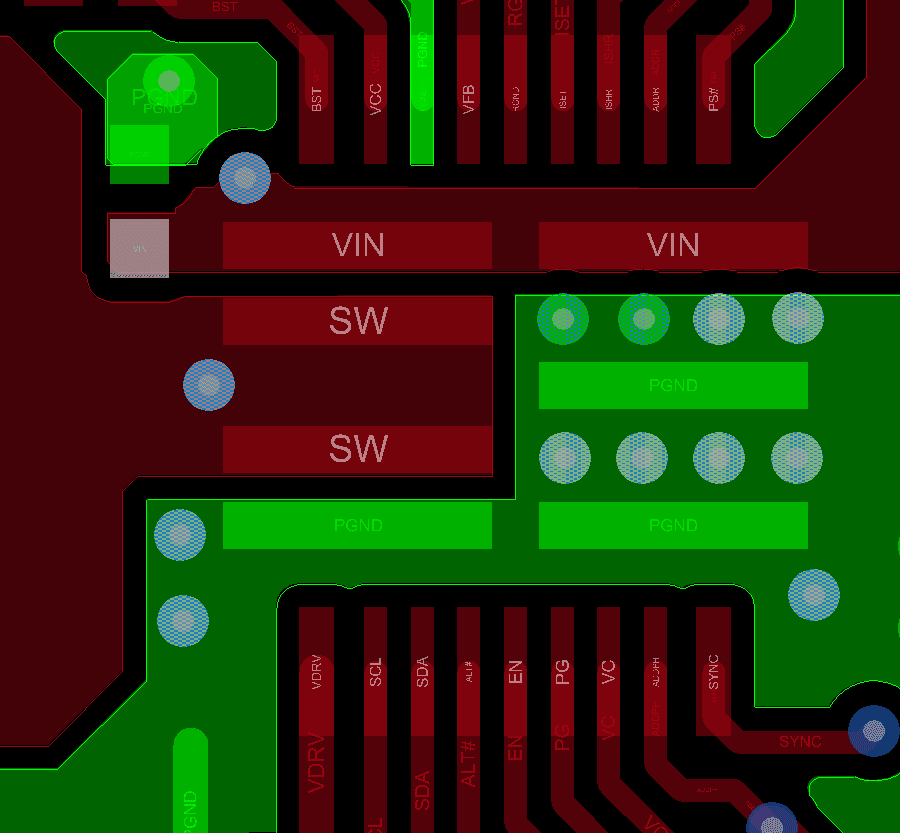
- Place a 1uF 0402 small decoupling capacitor near each of the two VIN pins.
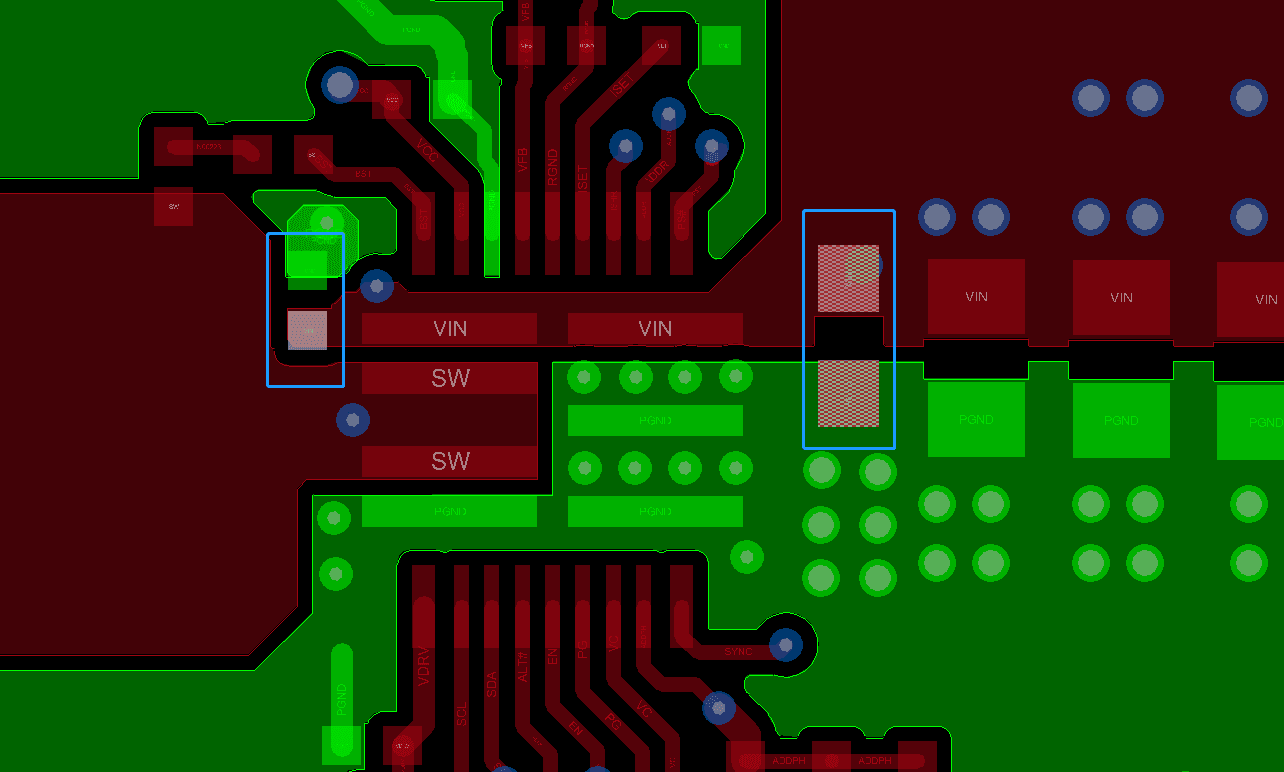
- Sensitive traces [such as VFB, RGND, SYNC, ISHR, VC] should be routed away from interfering signals [such as SW, BST, VIN].
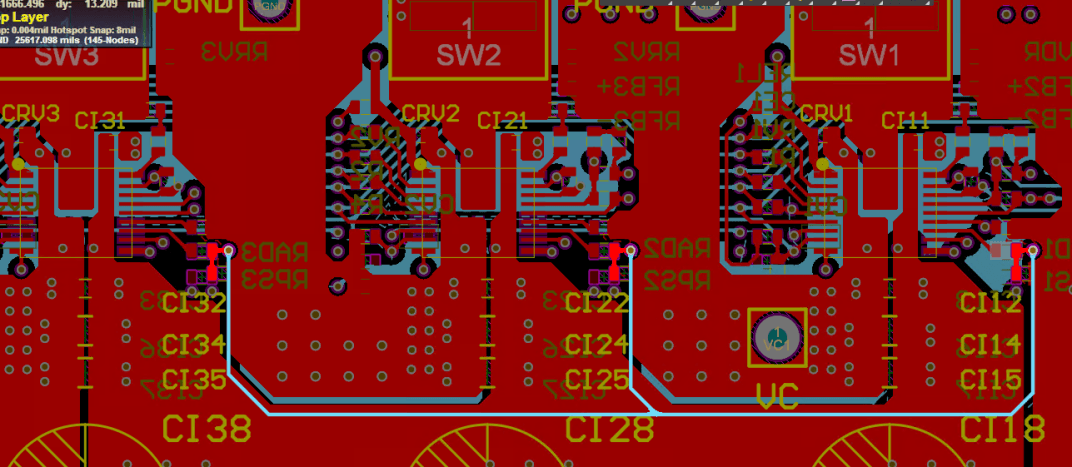
- Keep the BST loop as short as possible.
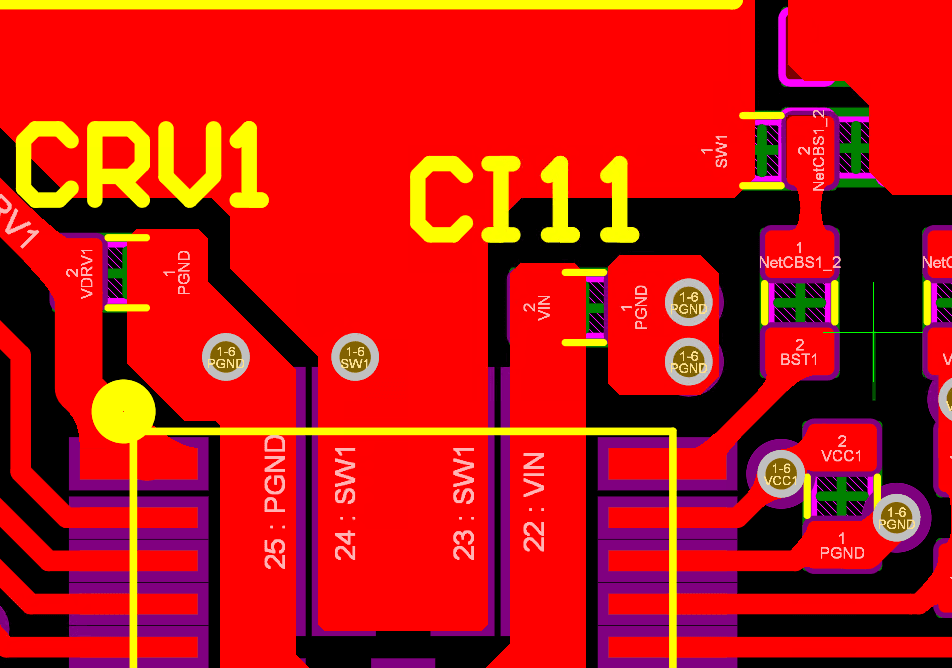
- Place the VCC and VDRV capacitors as close as possible to their respective pins, preferably on the same layer.
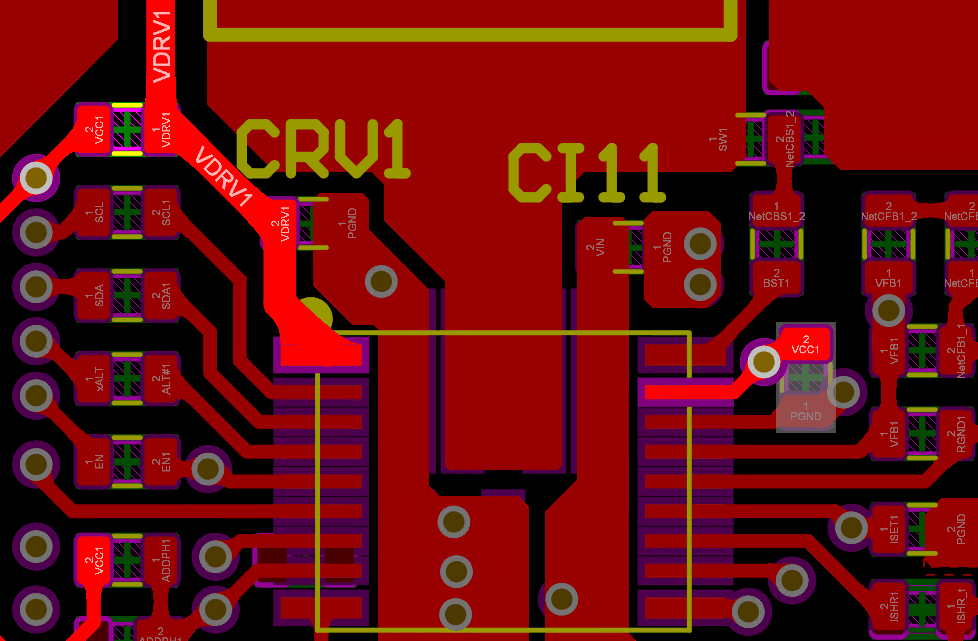
- Place the ISET, ADDR, and ADDPH resistors as close as possible to their respective pins and use 1% tolerance resistors.